TYPE
Open Source Desktop AppSTACK
Electron Vite React TypeScript Better-SQLite3 Ollama Base UI PlaywrightLIVE
View SiteWhy I Built This
I wanted a snippet manager that keeps everything local. No cloud sync, no accounts, no sending my code to external servers. Just a desktop app with a local database and optional AI that runs on my machine.
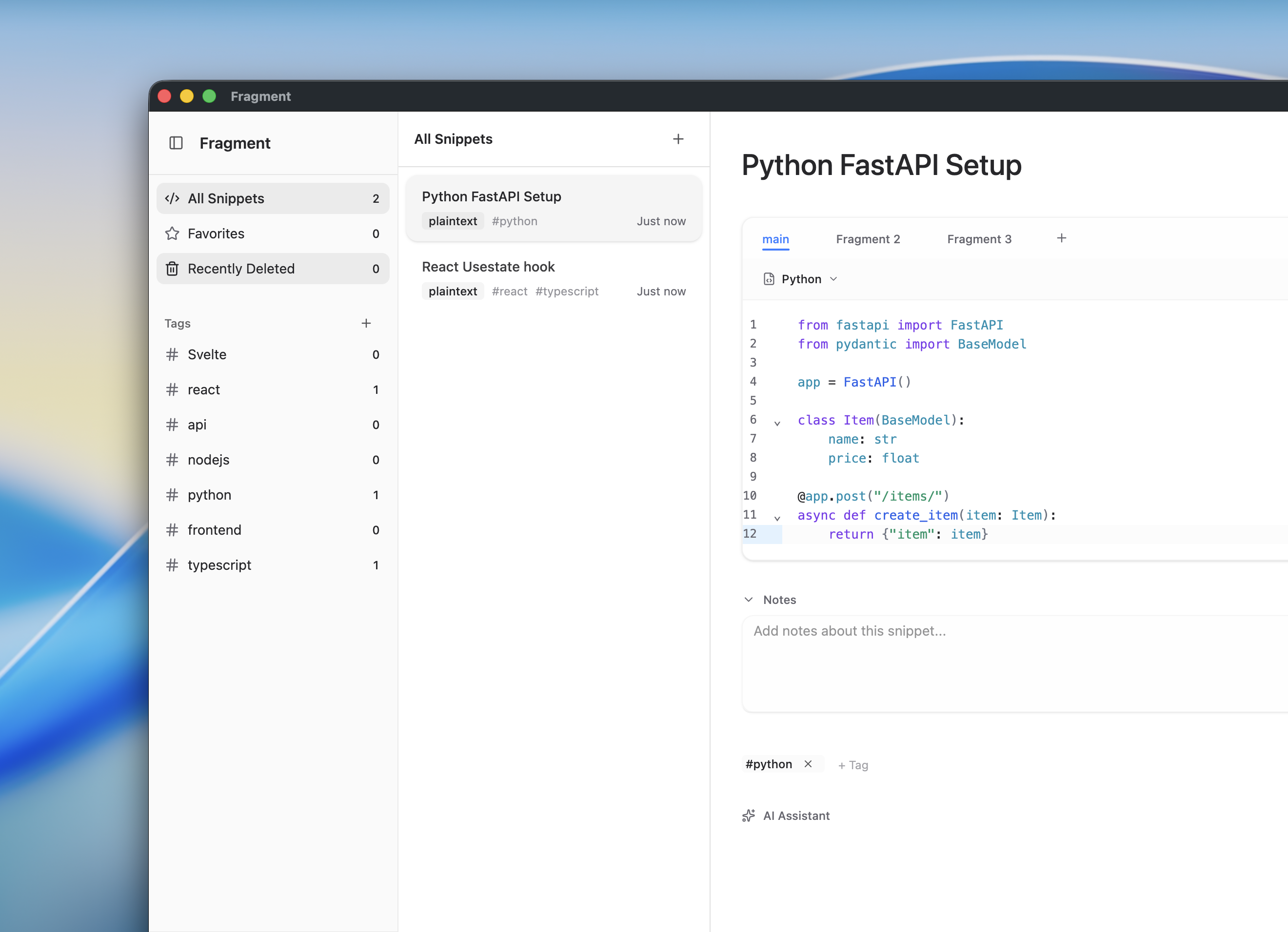
Most snippet managers either force you into their cloud ecosystem or lack good organization features. Fragment does neither—it’s completely local-first with drag-drop tagging and multi-language support per snippet.
What Makes It Different
Everything is Local: Your snippets live in a SQLite database on your machine. The AI runs locally via Ollama. Nothing leaves your computer.
Multi-Fragment Snippets: Instead of one code block per snippet, you can have multiple. Useful for documenting APIs—the request interface, the cURL command, and the response type all in one place.
Offline AI: Connect Ollama and get explanations, comments, and usage examples without API keys or internet. It just works.
How It Works
# Global quick capture (system-wide shortcut)Cmd+Shift+C → Saves clipboard to new snippet
# Inside the appCmd+K → Quick switcher (fuzzy search)Cmd+N → New snippetDrag snippets onto tags to organizeThe app is built with Electron and stores everything in Better-SQLite3 with WAL mode for fast concurrent access. The UI uses Base UI components and COSS UI for styling—lightweight, accessible, and customizable.
The Local AI Part
I integrated Ollama for local AI features. You download a model like codellama or deepseek-coder, and Fragment talks to it:
// Simple HTTP calls to local Ollamaasync function explainCode(code: string) { const res = await fetch('http://localhost:11434/api/chat', { method: 'POST', body: JSON.stringify({ model: 'codellama', messages: [{ role: 'user', content: `Explain: ${code}` }] }) }) return res.json()}Results get cached in the database, so you only process each snippet once.
Three AI actions:
- Explain - “What does this code do?”
- Comment - Adds inline comments
- Usage Example - Shows how to use it
All private, all local, no API costs.
Why Better-SQLite3
I chose Better-SQLite3 because it’s synchronous and doesn’t need an ORM. For desktop apps, that’s perfect—no async overhead, just direct SQL.
db.pragma('journal_mode = WAL') // Write-Ahead Loggingdb.pragma('foreign_keys = ON') // Enforce relationshipsWAL mode means reads don’t block writes. When the AI is processing, the UI stays responsive.
The UI Layer
Then I used COSS UI which provides beautifully styled components built on top of Base UI. Copy-paste the components you need, customize them, and you own the code. No bloated npm packages.
The drag-drop uses @dnd-kit:
- Drag snippets onto tags to organize
- Multi-select and drag multiple at once
- Reorder tags by dragging
Testing with Playwright
I used Playwright for end-to-end testing of the Electron app. Testing desktop apps is trickier than web apps, but Playwright’s Electron support made it manageable.
// Launch the Electron app and test itconst electronApp = await electron.launch({ args: ['.'] })const window = await electronApp.firstWindow()
// Test snippet creationawait window.click('[data-testid="new-snippet"]')await window.fill('[data-testid="snippet-title"]', 'Test Snippet')await window.click('[data-testid="save"]')
// Verify it appears in the listawait expect(window.locator('text=Test Snippet')).toBeVisible()This caught issues like:
- IPC handlers not responding correctly
- Database migrations failing
- UI state bugs that only appeared in the built app
Having automated tests gave me confidence to refactor and add features without breaking existing functionality.
What I Learned
Local-first is liberating: No backend, no auth, no API limits. Just build features.
Electron IPC needs structure: I used typed preload scripts to bridge main/renderer processes safely. TypeScript made this way easier.
Better-SQLite3 is fast: Synchronous API, WAL mode, zero ORM overhead. Perfect for desktop.
Base UI + COSS UI is a great combo: Accessible primitives with clean styling. No bloated component library.
Ollama makes local AI practical: Running a 7B model locally on Apple Silicon is genuinely usable. Privacy benefits are huge.
Playwright for Electron testing works: End-to-end tests caught bugs that unit tests missed. Testing the full IPC flow and database interactions was crucial.
Get It
git clone https://github.com/JudeTejada/Fragmentscd Fragmentsbun install
# Run itbun dev
# Build for your OSbun build:mac / bun build:win / bun build:linuxThis project solved a real problem for me—managing snippets without sending my code to someone else’s servers. Everything runs locally, and it’s fast. The code is open source on GitHub.